

What players say
Melody Duel Rhythm Challenge offers a unique twist on rhythm games with its role-swap narrative. The gameplay is engaging, requiring precise timing to hit notes. Multiple songs provide variety and increasing difficulty. Being free and browser-based makes it accessible. The desktop optimization ensures smooth performance, and full-screen mode enhances immersion. A solid choice for music game fans.
About this game
Game Introduction
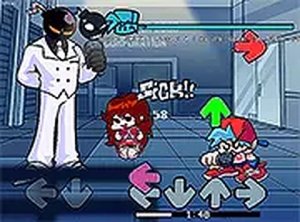
Melody Duel Rhythm Challenge is a browser-based music game that puts a new spin on classic rhythm gameplay. In this version, players take on musical duels against two distinct opponents: one with electric abilities and another who is a determined pursuer. The core objective is to hit the correct notes in time with the music to win each encounter. This game is family-friendly and free to play directly in your browser, optimized for desktop use. The game is designed for desktop or laptop computers for smooth performance. Players can also switch to full-screen mode for a more immersive experience. Focus on timing and rhythm to succeed.
How to Play
To play, you use your keyboard to press arrow keys that match the notes appearing on screen. The goal is to hit each note in sync with the beat, building your score and progressing through the story. The game is designed for desktop or laptop computers for smooth performance. You can also switch to full-screen mode for a more immersive experience. Focus on timing and rhythm to succeed.
Game Features
Rhythm-based gameplay that requires precise timing. A role-swap story offers a unique narrative compared to the original game. Multiple songs provide variety and increasing challenge. The game is desktop-optimized for smooth performance. It is free to play with no downloads needed, accessible directly in your browser.
Tips for Success
Practice each song to learn its unique rhythm pattern. Start with easier songs to build your timing skills before tackling harder ones. Use a consistent key press technique to avoid mistakes. Listen carefully to the music as it guides your note hits. Take breaks if you feel frustrated to maintain focus. Regular practice will help you master the game's challenges.

Player comments
Sign in to comment
You must be logged in before posting a review or rating.
No account? Create one
No comments yet. Be the first to comment!